

Skip to content
  • Order Link
    • Profile Crowd Links
    • Forum Crowd Links
    • Article Comments
    • EDU and GOV Links
    • Article WEB 2.0 Links
    • Trust Submits
    • Blog Article Links
    • Guest Posts
    • Outreach Links
    • Homepage Links
    • Sitewide Links
    • PBN Links
    • Link Insertion
    • Social Media Links
    • Tier2/Tier3 Links
    • Xrumer Links
  • PBN
    • Turnkey PBN
  • More Links
    • Links to specifications
      • SEO Backlinks
      • Quality Backlinks
      • Natural Backlinks
      • Dofollow Links
      • Nofollow Links
      • Permanent (Lifetime) Links
      • Authority-Passing Links
  • About Me
  • Blog
    • Link types
    • Live
  • EN
    • UA
    • EN
    • RU
  • Order Link
    • Profile Crowd Links
    • Forum Crowd Links
    • Article Comments
    • EDU and GOV Links
    • Article WEB 2.0 Links
    • Trust Submits
    • Blog Article Links
    • Guest Posts
    • Outreach Links
    • Homepage Links
    • Sitewide Links
    • PBN Links
    • Link Insertion
    • Social Media Links
    • Tier2/Tier3 Links
    • Xrumer Links
  • PBN
    • Turnkey PBN
  • More Links
    • Links to specifications
      • SEO Backlinks
      • Quality Backlinks
      • Natural Backlinks
      • Dofollow Links
      • Nofollow Links
      • Permanent (Lifetime) Links
      • Authority-Passing Links
  • About Me
  • Blog
    • Link types
    • Live
  • EN
    • UA
    • EN
    • RU
Close

Search

  • fb
  • linked
  • Tg
  • insta
  • you
Live

How to Increase CTR in Contextual Advertising

By Андрей Сорока
29.06.2020 2 Min Read
0

Let me share a useful trick—just for you, my dear readers. Here’s how you can increase the CTR of your contextual ads and really stand out. Google has a feature called “Google Customer Reviews,” which lets customers rate the quality of service provided by a company and its managers.

What is it, and how does it work? You place an order in an online store. A manager calls you—or doesn’t—to confirm the details. The product is then packed and shipped. It arrives at the post office, you receive a delivery notification, pick up the order, and that’s it—the product is yours. In Ukraine, this entire process usually takes anywhere from two or three days to a week.

After some time, Google sends an email to a selected number of customers—not everyone—asking them to rate the quality of service provided by the manager and the company as a whole on a five-point scale: http://joxi.ru/Dr8JxneTz8p0w2.
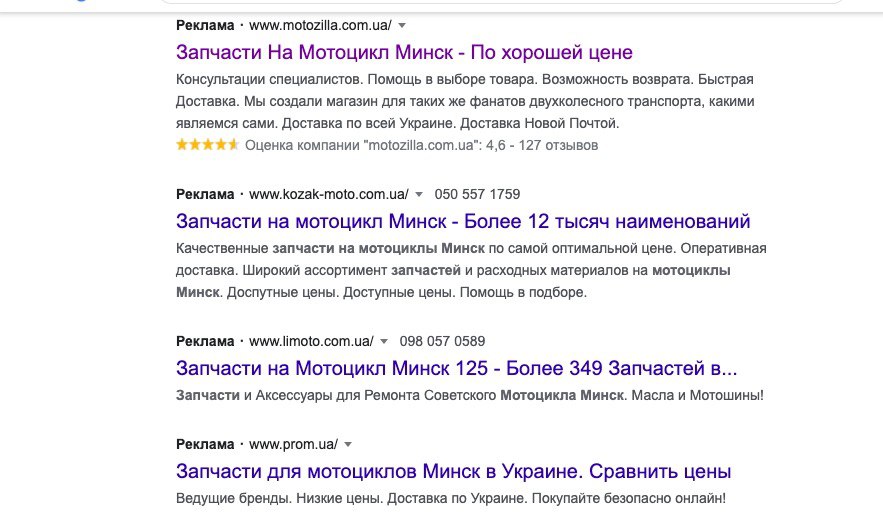
Once the company has received more than 100 ratings, the score can appear in Google Search ads and Shopping ads. You can see what it looks like in the screenshot—and it looks great.

There is also a direct link to the company’s ratings and reviews page: https://www.google.com/shopping/ratings/account/metric?q=motozilla.com.ua&c=UA&v=9&authuser=1&pageId=none. There, you can see what customers wrote, when they submitted their reviews, and what ratings they gave. Everything is publicly available.

How can you implement this in your online store?
You can do it through the Google Customer Reviews program. Setup instructions and additional details are available here: https://support.google.com/merchants/topic/7095697?hl=ru&ref_topic=7257954. This is Google’s own platform for collecting customer feedback on behalf of sellers. You connect your website to Google → Google tracks purchases → after a purchase, Google emails the customer and asks them to rate your store. The program is available in most countries, including Ukraine and Russia, as I mentioned above.

You need to connect your website to the program by installing the survey opt-in module: https://support.google.com/merchants/answer/7106244?hl=ru&ref_topic=7105160. The module sends transaction information to Google and invites the customer to participate in a survey. If the customer agrees, they will receive an email with a questionnaire after their order has been delivered—the same email shown in the screenshot above.

Did you know about this feature?
_____________________

Need backlinks? Send me a direct message on Telegram: https://t.me/andrey_soroka

CIS and international markets (gambling, casinos, dating, crypto, and white-hat projects)

My channel about SEO, link building, and iGaming: https://t.me/info_site

Author

Андрей Сорока

Follow Me
Other Articles
Previous

Yandex Has Gone Too Far

Next

How to Promote an Informational Website and Drive Traffic

No Comment! Be the first one.

    Leave a Reply Cancel reply

    Your email address will not be published. Required fields are marked *

    • Order Link
      • Profile Crowd Links
      • Forum Crowd Links
      • Article Comments
      • EDU and GOV Links
      • Article WEB 2.0 Links
      • Trust Submits
      • Blog Article Links
      • Guest Posts
      • Outreach Links
      • Homepage Links
      • Sitewide Links
      • PBN Links
      • Link Insertion
      • Tier2/Tier3 Links
      • Xrumer Links
      • Social Media Links
    • Links to specifications
      • SEO Backlinks
      • Quality Backlinks
      • Natural Backlinks
      • Dofollow Links
      • Nofollow Links
      • Permanent (Lifetime) Links
      • Authority-Passing Links
    • Turnkey PBN
    • About Me
    • Live
    • Link types
    • Facebook
    • LinkedIn
    • https://t.me/andrey_soroka
    • https://www.instagram.com/andrey_soroka93
    • https://www.youtube.com/channel/UC_Fl46jgMX-Wp3UQo0x9S2g
    Copyright 2026 — . All rights reserved. Blogsy WordPress Theme
    We use cookies to ensure that we give you the best experience on our website. If you continue to use this site we will assume that you are happy with it.